
100 + Customers
We've proudly served over 100 satisfied customers with our quality products.
🔥 New Flash Sale: Enjoy 20% OFF storewide today!
--d --h --m --s
Store / Package
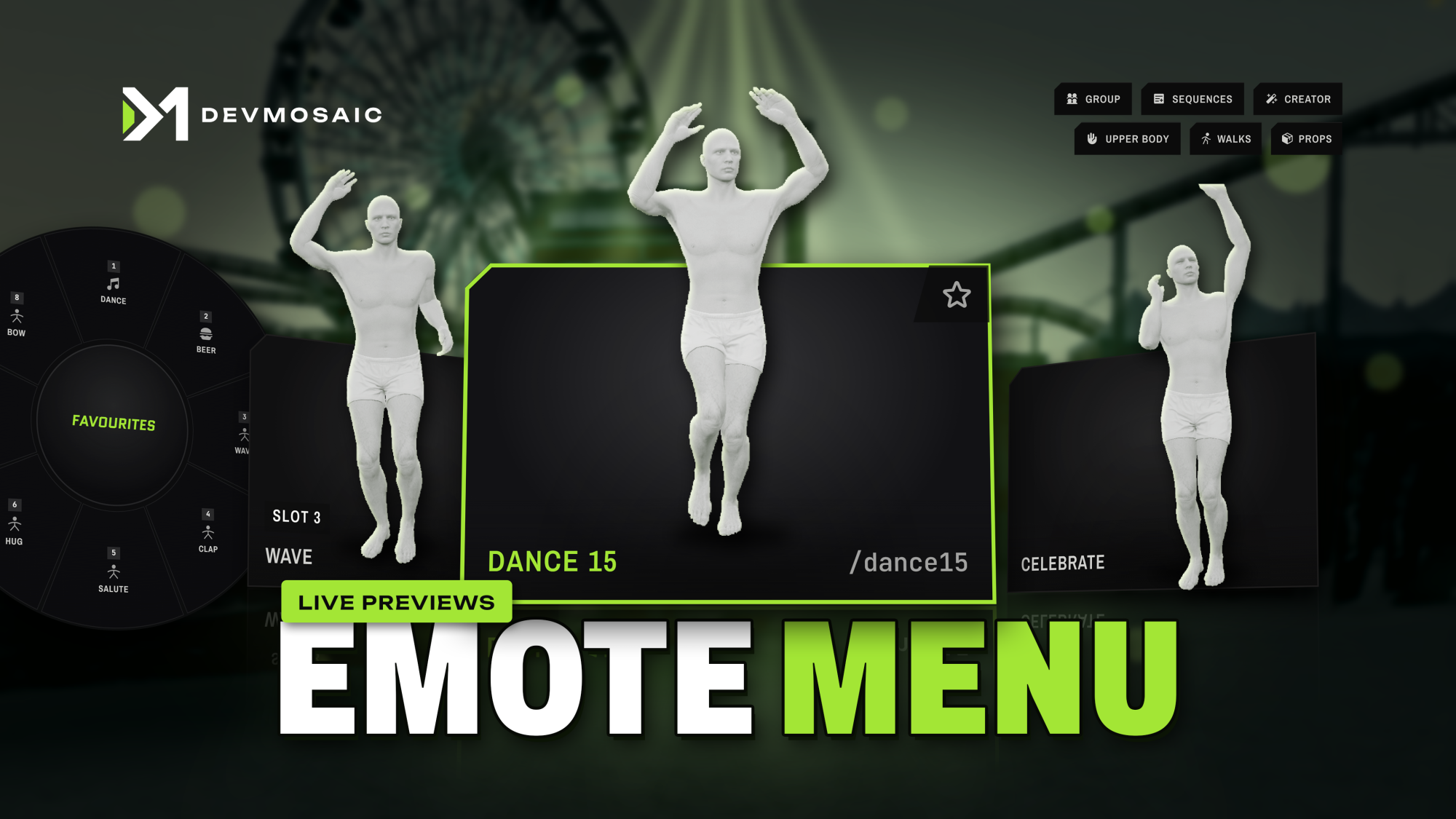
<p><img src="https://r2.fivemanage.com/bSIDWax0ghhfzLpyxnJco/DM_EmoteMenu_Store/dm-emotemenu-showcase-gif.gif" alt="DM Emote Menu showcase"></p>
<p>An emote menu that shows you the move before you play it. Every card plays a live preview: a white mannequin doing the move, with its props in real colour, across 2,900+ emotes, walks, faces and scenarios. Pin emotes to quick slots or a wheel, hug and dance with friends in sync, join another player's emote with the target eye, sit on real chairs, walls and steps, and place any emote up to 6 m away. Scripts made for scully_emotemenu, rpemotes or dpemotes keep working with zero edits.</p>
<p><strong>Escrow edition.</strong> <code>shared/config.lua</code>, the bridge files and every emote data file in <code>data/</code> are 100% open and unencrypted.</p>
<p><a class="dm-btn" href="https://devmosaic.gitbook.io/devmosaic/resources/devmosaic-dm-emotemenu" target="_blank" rel="noopener">View Full Documentation & Config Guide →</a></p>
<p>Docs: <a href="https://devmosaic.gitbook.io/devmosaic/resources/devmosaic-dm-emotemenu" target="_blank" rel="noopener">https://devmosaic.gitbook.io/devmosaic/resources/devmosaic-dm-emotemenu</a></p>
<h2>Product Features</h2>
<h3>{fa-solid fa-film} Live Previews on Every Card</h3>
<ul>
<li>Every card shows a white mannequin doing the move, with its props in real colour.</li>
<li>2,900+ emotes, walks, faces and scenarios, each with its own preview.</li>
<li>Still posters ship inside the resource. The moving preview loads only while a player hovers or focuses a card, so players download almost nothing extra.</li>
</ul>
<h3>{fa-solid fa-magnifying-glass} Search, Tabs and Filters</h3>
<ul>
<li>Tabs: All, Favourites, Sit, Emotes, Dances, Props, Food & Drink, Shared, Walks, Faces, Scenarios, Animals and My Emotes.</li>
<li>Filters: With prop, Duo and With effect.</li>
<li>Full keyboard control: arrow keys, Enter to play, F favourite, S slot, P place, hold Space to peek through the menu, Esc to close.</li>
<li>Favourites, and the last 10 emotes you played.</li>
</ul>
<h3>{fa-solid fa-keyboard} Quick Slots and Quick Wheel</h3>
<ul>
<li>8 quick slots: press S on any card to fill one.</li>
<li>Set any key per slot, SHIFT + key included.</li>
<li>Hold Z for a wheel of your favourites, or of your slots.</li>
</ul>
<h3>{fa-solid fa-handshake} Duo Emotes</h3>
<ul>
<li>Hug, handshake and more with another player.</li>
<li>Pick your partner with a marker over their head and switch with the arrow keys, or send it to the closest player (a setting).</li>
<li>They accept with Y or decline with Backspace. The partner must be within 3 m, and the request lasts 10 s.</li>
</ul>
<h3>{fa-solid fa-users} Group Dances</h3>
<ul>
<li>Start a group and invite players within 15 m.</li>
<li>Turn on Group mode and the whole group dances in sync with you.</li>
</ul>
<h3>{fa-solid fa-user-plus} Join Any Emote</h3>
<ul>
<li>Pick Join on a player with the target eye (or look at them and press J) to play their emote with them, in perfect sync.</li>
<li>You play the same emote in perfect sync, with the player you look at within 5 m.</li>
</ul>
<h3>{fa-solid fa-chair} Real Seats</h3>
<ul>
<li>Sit or lie on real chairs, benches and sofas with the target eye or <code>/sit</code>, at the seat points GTA itself uses.</li>
<li>About 550 chair models are known, plus about 1,000 seats, walls and steps in the GTA map.</li>
<li>Press E while seated to change pose without getting up: 9 sitting poses and 7 lying poses.</li>
<li>X stands up with a natural exit. "Sit next to them" puts you beside a friend on their bench.</li>
</ul>
<h3>{fa-solid fa-stairs} Sit Anywhere</h3>
<ul>
<li><code>/sit</code> with no chair close by sits on a low wall, step or ledge, leans on a tall wall, or sits on the ground.</li>
<li>When the player gets up, they go back to where they stood.</li>
</ul>
<h3>{fa-solid fa-location-dot} Place Any Emote Anywhere</h3>
<ul>
<li>Press P in the menu for a ghost of the emote and move it up to 6 m away. It snaps onto seats.</li>
<li>The player walks there and plays it.</li>
<li>When it ends, they walk back to where they stood, which stops wall and door exploits (<code>Config.PlaceReturn</code>).</li>
</ul>
<h3>{fa-solid fa-guitar} Props and Effects</h3>
<ul>
<li>Props in the hands: guitar, surfboard, umbrella, phone, drinks and more.</li>
<li>Effects started with G: money rain, sparks, smoke.</li>
<li>Every player sees your props and effects.</li>
</ul>
<h3>{fa-solid fa-gauge-high} Speed Control</h3>
<ul>
<li>Play the current emote faster or slower with PAGEUP and PAGEDOWN, from 0.1x to 2.0x in 0.1 steps.</li>
<li>The speed is synced to every player.</li>
</ul>
<h3>{fa-solid fa-camera-retro} Pose Mode</h3>
<ul>
<li>Freeze the emote and scrub to the exact frame.</li>
<li>Hide the HUD for the perfect screenshot.</li>
</ul>
<h3>{fa-solid fa-swatchbook} Emote Styles and Upper Body</h3>
<ul>
<li>Some emotes have styles, such as another phone colour or another clip. The choice is remembered per emote.</li>
<li>Upper body only: walk while you drink, smoke or wave.</li>
</ul>
<h3>{fa-solid fa-car} Vehicles, Hands Up, Point and Crouch</h3>
<ul>
<li>Emotes inside vehicles (<code>Config.AllowInVehicles</code>).</li>
<li>Hands up on H, point on B and crouch on Left Ctrl.</li>
</ul>
<h3>{fa-solid fa-person-walking} 134 Walk Styles and 60 Faces</h3>
<ul>
<li>134 walk styles and 60 facial expressions.</li>
<li>Saved per character (citizenid or identifier) on Qbox, QBCore and ESX.</li>
<li><code>/walk alien</code> and <code>/face angry</code> from the chat; <code>c</code> resets them.</li>
</ul>
<h3>{fa-solid fa-table-columns} Two Layouts</h3>
<ul>
<li>A full grid, or a side panel on the left or right.</li>
<li>Menu size from 70 to 130 %, a solid or blurred background, and commands on the cards.</li>
</ul>
<h3>{fa-solid fa-palette} Your Colour, 30 Languages</h3>
<ul>
<li><code>Config.Color</code> recolours the whole menu.</li>
<li>30 languages, Arabic, Japanese and Chinese included.</li>
</ul>
<h3>{fa-solid fa-list-ol} Sequences</h3>
<ul>
<li>Chain emotes into a named sequence of up to 12 steps and play it as one.</li>
<li>Save up to 20 sequences.</li>
</ul>
<h3>{fa-solid fa-wand-magic-sparkles} Emote Creator</h3>
<ul>
<li>Make your own emotes in game: dictionary, clip, name, command, and props placed with position and rotation sliders.</li>
<li>Up to 100 custom emotes.</li>
<li>Choose who can use it with <code>Config.Creator</code>: <code>'admin'</code>, <code>'everyone'</code> or <code>false</code>.</li>
</ul>
<h3>{fa-solid fa-camera} Preview Studio</h3>
<ul>
<li>A private studio for admins (<code>/emotestudio</code>): magenta key box, white mannequin and real props.</li>
<li>Camera presets for body, head, face and animal, and a mannequin tone slider.</li>
<li>Tick groups (General, Dances, Props, Shared, Animals, Walks, Expressions, Scenarios) and press Shoot ticked groups, with a "Skip emotes that already have a preview" checkbox.</li>
<li>Or shoot only the emotes you select, with a progress bar, pause and stop.</li>
</ul>
<h3>{fa-solid fa-cloud-arrow-up} Your Own Previews</h3>
<ul>
<li>Chat shortcuts: <code>/emotestudio kind <emote|walk|expression|scenario></code> shoots a whole kind, and <code>/emotestudio all</code> shoots everything that has no preview yet.</li>
<li>Shoot your own emotes too: the creator's emotes and any emote added through <code>addEmoteToMenu</code>.</li>
<li>Works on the first start with the DevMosaic preview link. We strongly recommend shooting your own previews with your own FiveManage key: see the docs.</li>
</ul>
<h3>{fa-solid fa-plug} Zero Edits for Your Other Scripts</h3>
<ul>
<li>Answers every export, event and state bag of scully_emotemenu, rpemotes, rpemotes-reborn and dpemotes.</li>
<li>qb-core scripts too: <code>animations:client:EmoteCommandStart</code> and <code>animations:ToggleCanDoAnims</code>.</li>
<li>Example: qbx_truckerjob's unedited <code>exports.scully_emotemenu:playEmoteByCommand('box')</code> plays in DM Emote Menu.</li>
<li>If the old menu is still running, the bridge stays out of its way.</li>
<li>Block emotes from another script with <code>exports['dm-emotemenu']:setLimitation(true)</code>.</li>
</ul>
<h3>{fa-solid fa-server} Compatibility</h3>
<ul>
<li>Standalone. On Qbox, QBCore and ESX it saves walk and face per character; it works without any of them.</li>
<li>Requires ox_lib. Optional: ox_target, qb-target or qtarget for sitting with the target eye and the Join option.</li>
<li>No SQL tables.</li>
</ul>
<h2>Visual Features</h2>
<h3>{fa-solid fa-film} Live Previews on Every Card</h3>
<img src="https://r2.fivemanage.com/bSIDWax0ghhfzLpyxnJco/DM_EmoteMenu_Store/dm-emotemenu-live-previews.jpg" alt="Live Previews on Every Card">
<p>Every card plays the move on a white mannequin, with its props in real colour, before you pick it.</p>
<h3>{fa-solid fa-keyboard} Quick Slots and the Wheel</h3>
<img src="https://r2.fivemanage.com/bSIDWax0ghhfzLpyxnJco/DM_EmoteMenu_Store/dm-emotemenu-wheel.jpg" alt="Quick Slots and the Wheel">
<p>8 quick slots, each with its own key, and a wheel of your favourites on Z.</p>
<h3>{fa-solid fa-handshake} Pick Your Partner</h3>
<img src="https://r2.fivemanage.com/bSIDWax0ghhfzLpyxnJco/DM_EmoteMenu_Store/dm-emotemenu-duo-partner.jpg" alt="Pick Your Partner">
<p>Hugs, handshakes and more. Pick your partner with a marker over their head; they accept with Y.</p>
<h3>{fa-solid fa-users} Group Dances in Sync</h3>
<img src="https://r2.fivemanage.com/bSIDWax0ghhfzLpyxnJco/DM_EmoteMenu_Store/dm-emotemenu-group-dance.jpg" alt="Group Dances in Sync">
<p>Start a group, invite players within 15 m, and the whole group dances in sync.</p>
<h3>{fa-solid fa-user-plus} Join Any Emote</h3>
<img src="https://r2.fivemanage.com/bSIDWax0ghhfzLpyxnJco/DM_EmoteMenu_Store/dm-emotemenu-join-sync.jpg" alt="Join Any Emote">
<p>Pick Join on a player with the target eye and play their emote with them, in perfect sync.</p>
<h3>{fa-solid fa-chair} Real Seats</h3>
<img src="https://r2.fivemanage.com/bSIDWax0ghhfzLpyxnJco/DM_EmoteMenu_Store/dm-emotemenu-seat-poses.jpg" alt="Real Seats">
<p>Sit or lie on real chairs and benches at the seat points GTA itself uses, and change pose without getting up.</p>
<h3>{fa-solid fa-location-dot} Place Any Emote Anywhere</h3>
<img src="https://r2.fivemanage.com/bSIDWax0ghhfzLpyxnJco/DM_EmoteMenu_Store/dm-emotemenu-place-ghost.jpg" alt="Place Any Emote Anywhere">
<p>Move a ghost of the emote up to 6 m away. It snaps onto seats, and you walk back to where you stood when it ends.</p>
<h3>{fa-solid fa-guitar} Props and Effects</h3>
<img src="https://r2.fivemanage.com/bSIDWax0ghhfzLpyxnJco/DM_EmoteMenu_Store/dm-emotemenu-effects.jpg" alt="Props and Effects">
<p>Props in the hands and effects on G, like money rain. Every player sees them.</p>
<h3>{fa-solid fa-palette} Your Colour, 30 Languages</h3>
<img src="https://r2.fivemanage.com/bSIDWax0ghhfzLpyxnJco/DM_EmoteMenu_Store/dm-emotemenu-colours-arabic.jpg" alt="Your Colour, 30 Languages">
<p>One config line recolours the whole menu, in any of 30 languages.</p>
<h3>{fa-solid fa-wand-magic-sparkles} Emote Creator</h3>
<img src="https://r2.fivemanage.com/bSIDWax0ghhfzLpyxnJco/DM_EmoteMenu_Store/dm-emotemenu-creator.jpg" alt="Emote Creator">
<p>Make your own emotes in game: dictionary, clip, command, and props placed with sliders.</p>
<h3>{fa-solid fa-camera} Preview Studio</h3>
<img src="https://r2.fivemanage.com/bSIDWax0ghhfzLpyxnJco/DM_EmoteMenu_Store/dm-emotemenu-studio-overview.jpg" alt="Preview Studio">
<p>Shoot previews for whole groups in a private studio, straight into your own FiveManage account.</p>
<h3>{fa-solid fa-plug} Zero Edits for Your Scripts</h3>
<img src="https://r2.fivemanage.com/bSIDWax0ghhfzLpyxnJco/DM_EmoteMenu_Store/dm-emotemenu-compatibility.jpg" alt="Zero Edits for Your Scripts">
<p>Scripts made for scully_emotemenu, rpemotes or dpemotes keep working, untouched.</p>
```
### Open source edition
```html
<p><img src="https://r2.fivemanage.com/bSIDWax0ghhfzLpyxnJco/DM_EmoteMenu_Store/dm-emotemenu-showcase-gif.gif" alt="DM Emote Menu showcase"></p>
<p>An emote menu that shows you the move before you play it. Every card plays a live preview: a white mannequin doing the move, with its props in real colour, across 2,900+ emotes, walks, faces and scenarios. Pin emotes to quick slots or a wheel, hug and dance with friends in sync, join another player's emote with the target eye, sit on real chairs, walls and steps, and place any emote up to 6 m away. Scripts made for scully_emotemenu, rpemotes or dpemotes keep working with zero edits.</p>
<p><strong>Open source edition.</strong> Everything is open and nothing is encrypted. The React UI source is included.</p>
<p><a class="dm-btn" href="https://devmosaic.gitbook.io/devmosaic/resources/devmosaic-dm-emotemenu" target="_blank" rel="noopener">View Full Documentation & Config Guide →</a></p>
<p>Docs: <a href="https://devmosaic.gitbook.io/devmosaic/resources/devmosaic-dm-emotemenu" target="_blank" rel="noopener">https://devmosaic.gitbook.io/devmosaic/resources/devmosaic-dm-emotemenu</a></p>
<h2>Product Features</h2>
<h3>{fa-solid fa-film} Live Previews on Every Card</h3>
<ul>
<li>Every card shows a white mannequin doing the move, with its props in real colour.</li>
<li>2,900+ emotes, walks, faces and scenarios, each with its own preview.</li>
<li>Still posters ship inside the resource. The moving preview loads only while a player hovers or focuses a card, so players download almost nothing extra.</li>
</ul>
<h3>{fa-solid fa-magnifying-glass} Search, Tabs and Filters</h3>
<ul>
<li>Tabs: All, Favourites, Sit, Emotes, Dances, Props, Food & Drink, Shared, Walks, Faces, Scenarios, Animals and My Emotes.</li>
<li>Filters: With prop, Duo and With effect.</li>
<li>Full keyboard control: arrow keys, Enter to play, F favourite, S slot, P place, hold Space to peek through the menu, Esc to close.</li>
<li>Favourites, and the last 10 emotes you played.</li>
</ul>
<h3>{fa-solid fa-keyboard} Quick Slots and Quick Wheel</h3>
<ul>
<li>8 quick slots: press S on any card to fill one.</li>
<li>Set any key per slot, SHIFT + key included.</li>
<li>Hold Z for a wheel of your favourites, or of your slots.</li>
</ul>
<h3>{fa-solid fa-handshake} Duo Emotes</h3>
<ul>
<li>Hug, handshake and more with another player.</li>
<li>Pick your partner with a marker over their head and switch with the arrow keys, or send it to the closest player (a setting).</li>
<li>They accept with Y or decline with Backspace. The partner must be within 3 m, and the request lasts 10 s.</li>
</ul>
<h3>{fa-solid fa-users} Group Dances</h3>
<ul>
<li>Start a group and invite players within 15 m.</li>
<li>Turn on Group mode and the whole group dances in sync with you.</li>
</ul>
<h3>{fa-solid fa-user-plus} Join Any Emote</h3>
<ul>
<li>Pick Join on a player with the target eye (or look at them and press J) to play their emote with them, in perfect sync.</li>
<li>You play the same emote in perfect sync, with the player you look at within 5 m.</li>
</ul>
<h3>{fa-solid fa-chair} Real Seats</h3>
<ul>
<li>Sit or lie on real chairs, benches and sofas with the target eye or <code>/sit</code>, at the seat points GTA itself uses.</li>
<li>About 550 chair models are known, plus about 1,000 seats, walls and steps in the GTA map.</li>
<li>Press E while seated to change pose without getting up: 9 sitting poses and 7 lying poses.</li>
<li>X stands up with a natural exit. "Sit next to them" puts you beside a friend on their bench.</li>
</ul>
<h3>{fa-solid fa-stairs} Sit Anywhere</h3>
<ul>
<li><code>/sit</code> with no chair close by sits on a low wall, step or ledge, leans on a tall wall, or sits on the ground.</li>
<li>When the player gets up, they go back to where they stood.</li>
</ul>
<h3>{fa-solid fa-location-dot} Place Any Emote Anywhere</h3>
<ul>
<li>Press P in the menu for a ghost of the emote and move it up to 6 m away. It snaps onto seats.</li>
<li>The player walks there and plays it.</li>
<li>When it ends, they walk back to where they stood, which stops wall and door exploits (<code>Config.PlaceReturn</code>).</li>
</ul>
<h3>{fa-solid fa-guitar} Props and Effects</h3>
<ul>
<li>Props in the hands: guitar, surfboard, umbrella, phone, drinks and more.</li>
<li>Effects started with G: money rain, sparks, smoke.</li>
<li>Every player sees your props and effects.</li>
</ul>
<h3>{fa-solid fa-gauge-high} Speed Control</h3>
<ul>
<li>Play the current emote faster or slower with PAGEUP and PAGEDOWN, from 0.1x to 2.0x in 0.1 steps.</li>
<li>The speed is synced to every player.</li>
</ul>
<h3>{fa-solid fa-camera-retro} Pose Mode</h3>
<ul>
<li>Freeze the emote and scrub to the exact frame.</li>
<li>Hide the HUD for the perfect screenshot.</li>
</ul>
<h3>{fa-solid fa-swatchbook} Emote Styles and Upper Body</h3>
<ul>
<li>Some emotes have styles, such as another phone colour or another clip. The choice is remembered per emote.</li>
<li>Upper body only: walk while you drink, smoke or wave.</li>
</ul>
<h3>{fa-solid fa-car} Vehicles, Hands Up, Point and Crouch</h3>
<ul>
<li>Emotes inside vehicles (<code>Config.AllowInVehicles</code>).</li>
<li>Hands up on H, point on B and crouch on Left Ctrl.</li>
</ul>
<h3>{fa-solid fa-person-walking} 134 Walk Styles and 60 Faces</h3>
<ul>
<li>134 walk styles and 60 facial expressions.</li>
<li>Saved per character (citizenid or identifier) on Qbox, QBCore and ESX.</li>
<li><code>/walk alien</code> and <code>/face angry</code> from the chat; <code>c</code> resets them.</li>
</ul>
<h3>{fa-solid fa-table-columns} Two Layouts</h3>
<ul>
<li>A full grid, or a side panel on the left or right.</li>
<li>Menu size from 70 to 130 %, a solid or blurred background, and commands on the cards.</li>
</ul>
<h3>{fa-solid fa-palette} Your Colour, 30 Languages</h3>
<ul>
<li><code>Config.Color</code> recolours the whole menu.</li>
<li>30 languages, Arabic, Japanese and Chinese included.</li>
</ul>
<h3>{fa-solid fa-list-ol} Sequences</h3>
<ul>
<li>Chain emotes into a named sequence of up to 12 steps and play it as one.</li>
<li>Save up to 20 sequences.</li>
</ul>
<h3>{fa-solid fa-wand-magic-sparkles} Emote Creator</h3>
<ul>
<li>Make your own emotes in game: dictionary, clip, name, command, and props placed with position and rotation sliders.</li>
<li>Up to 100 custom emotes.</li>
<li>Choose who can use it with <code>Config.Creator</code>: <code>'admin'</code>, <code>'everyone'</code> or <code>false</code>.</li>
</ul>
<h3>{fa-solid fa-camera} Preview Studio</h3>
<ul>
<li>A private studio for admins (<code>/emotestudio</code>): magenta key box, white mannequin and real props.</li>
<li>Camera presets for body, head, face and animal, and a mannequin tone slider.</li>
<li>Tick groups (General, Dances, Props, Shared, Animals, Walks, Expressions, Scenarios) and press Shoot ticked groups, with a "Skip emotes that already have a preview" checkbox.</li>
<li>Or shoot only the emotes you select, with a progress bar, pause and stop.</li>
</ul>
<h3>{fa-solid fa-cloud-arrow-up} Your Own Previews</h3>
<ul>
<li>Chat shortcuts: <code>/emotestudio kind <emote|walk|expression|scenario></code> shoots a whole kind, and <code>/emotestudio all</code> shoots everything that has no preview yet.</li>
<li>Shoot your own emotes too: the creator's emotes and any emote added through <code>addEmoteToMenu</code>.</li>
<li>Works on the first start with the DevMosaic preview link. We strongly recommend shooting your own previews with your own FiveManage key: see the docs.</li>
</ul>
<h3>{fa-solid fa-plug} Zero Edits for Your Other Scripts</h3>
<ul>
<li>Answers every export, event and state bag of scully_emotemenu, rpemotes, rpemotes-reborn and dpemotes.</li>
<li>qb-core scripts too: <code>animations:client:EmoteCommandStart</code> and <code>animations:ToggleCanDoAnims</code>.</li>
<li>Example: qbx_truckerjob's unedited <code>exports.scully_emotemenu:playEmoteByCommand('box')</code> plays in DM Emote Menu.</li>
<li>If the old menu is still running, the bridge stays out of its way.</li>
<li>Block emotes from another script with <code>exports['dm-emotemenu']:setLimitation(true)</code>.</li>
</ul>
<h3>{fa-solid fa-server} Compatibility</h3>
<ul>
<li>Standalone. On Qbox, QBCore and ESX it saves walk and face per character; it works without any of them.</li>
<li>Requires ox_lib. Optional: ox_target, qb-target or qtarget for sitting with the target eye and the Join option.</li>
<li>No SQL tables.</li>
</ul>
<h2>Visual Features</h2>
<h3>{fa-solid fa-film} Live Previews on Every Card</h3>
<img src="https://r2.fivemanage.com/bSIDWax0ghhfzLpyxnJco/DM_EmoteMenu_Store/dm-emotemenu-live-previews.jpg" alt="Live Previews on Every Card">
<p>Every card plays the move on a white mannequin, with its props in real colour, before you pick it.</p>
<h3>{fa-solid fa-keyboard} Quick Slots and the Wheel</h3>
<img src="https://r2.fivemanage.com/bSIDWax0ghhfzLpyxnJco/DM_EmoteMenu_Store/dm-emotemenu-wheel.jpg" alt="Quick Slots and the Wheel">
<p>8 quick slots, each with its own key, and a wheel of your favourites on Z.</p>
<h3>{fa-solid fa-handshake} Pick Your Partner</h3>
<img src="https://r2.fivemanage.com/bSIDWax0ghhfzLpyxnJco/DM_EmoteMenu_Store/dm-emotemenu-duo-partner.jpg" alt="Pick Your Partner">
<p>Hugs, handshakes and more. Pick your partner with a marker over their head; they accept with Y.</p>
<h3>{fa-solid fa-users} Group Dances in Sync</h3>
<img src="https://r2.fivemanage.com/bSIDWax0ghhfzLpyxnJco/DM_EmoteMenu_Store/dm-emotemenu-group-dance.jpg" alt="Group Dances in Sync">
<p>Start a group, invite players within 15 m, and the whole group dances in sync.</p>
<h3>{fa-solid fa-user-plus} Join Any Emote</h3>
<img src="https://r2.fivemanage.com/bSIDWax0ghhfzLpyxnJco/DM_EmoteMenu_Store/dm-emotemenu-join-sync.jpg" alt="Join Any Emote">
<p>Pick Join on a player with the target eye and play their emote with them, in perfect sync.</p>
<h3>{fa-solid fa-chair} Real Seats</h3>
<img src="https://r2.fivemanage.com/bSIDWax0ghhfzLpyxnJco/DM_EmoteMenu_Store/dm-emotemenu-seat-poses.jpg" alt="Real Seats">
<p>Sit or lie on real chairs and benches at the seat points GTA itself uses, and change pose without getting up.</p>
<h3>{fa-solid fa-location-dot} Place Any Emote Anywhere</h3>
<img src="https://r2.fivemanage.com/bSIDWax0ghhfzLpyxnJco/DM_EmoteMenu_Store/dm-emotemenu-place-ghost.jpg" alt="Place Any Emote Anywhere">
<p>Move a ghost of the emote up to 6 m away. It snaps onto seats, and you walk back to where you stood when it ends.</p>
<h3>{fa-solid fa-guitar} Props and Effects</h3>
<img src="https://r2.fivemanage.com/bSIDWax0ghhfzLpyxnJco/DM_EmoteMenu_Store/dm-emotemenu-effects.jpg" alt="Props and Effects">
<p>Props in the hands and effects on G, like money rain. Every player sees them.</p>
<h3>{fa-solid fa-palette} Your Colour, 30 Languages</h3>
<img src="https://r2.fivemanage.com/bSIDWax0ghhfzLpyxnJco/DM_EmoteMenu_Store/dm-emotemenu-colours-arabic.jpg" alt="Your Colour, 30 Languages">
<p>One config line recolours the whole menu, in any of 30 languages.</p>
<h3>{fa-solid fa-wand-magic-sparkles} Emote Creator</h3>
<img src="https://r2.fivemanage.com/bSIDWax0ghhfzLpyxnJco/DM_EmoteMenu_Store/dm-emotemenu-creator.jpg" alt="Emote Creator">
<p>Make your own emotes in game: dictionary, clip, command, and props placed with sliders.</p>
<h3>{fa-solid fa-camera} Preview Studio</h3>
<img src="https://r2.fivemanage.com/bSIDWax0ghhfzLpyxnJco/DM_EmoteMenu_Store/dm-emotemenu-studio-overview.jpg" alt="Preview Studio">
<p>Shoot previews for whole groups in a private studio, straight into your own FiveManage account.</p>
<h3>{fa-solid fa-plug} Zero Edits for Your Scripts</h3>
<img src="https://r2.fivemanage.com/bSIDWax0ghhfzLpyxnJco/DM_EmoteMenu_Store/dm-emotemenu-compatibility.jpg" alt="Zero Edits for Your Scripts">
<p>Scripts made for scully_emotemenu, rpemotes or dpemotes keep working, untouched.</p>
We've proudly served over 100 satisfied customers with our quality products.
Our scripts are optimized for maximum performance so your server runs smooth.
Fast updates, bug fixes, and ongoing support for all purchased scripts.
Payments, licensing and delivery all run through Tebex, so your purchase is protected end to end.
Just purchased
 CoconutRP
Today 10:46
 CtsDev
Today 08:34
 Prince_bhai
Today 05:24
 Dejan_Vojvodic
Today 01:09
 yeahitzaxe
Today 23:27
 Gixxy211
Today 22:14
 djjiggystarboy
Today 21:36
 Pancha_Develop
Tue 13:00
 Zentaris
Tue 10:47
 FullFrontal
Tue 06:52


