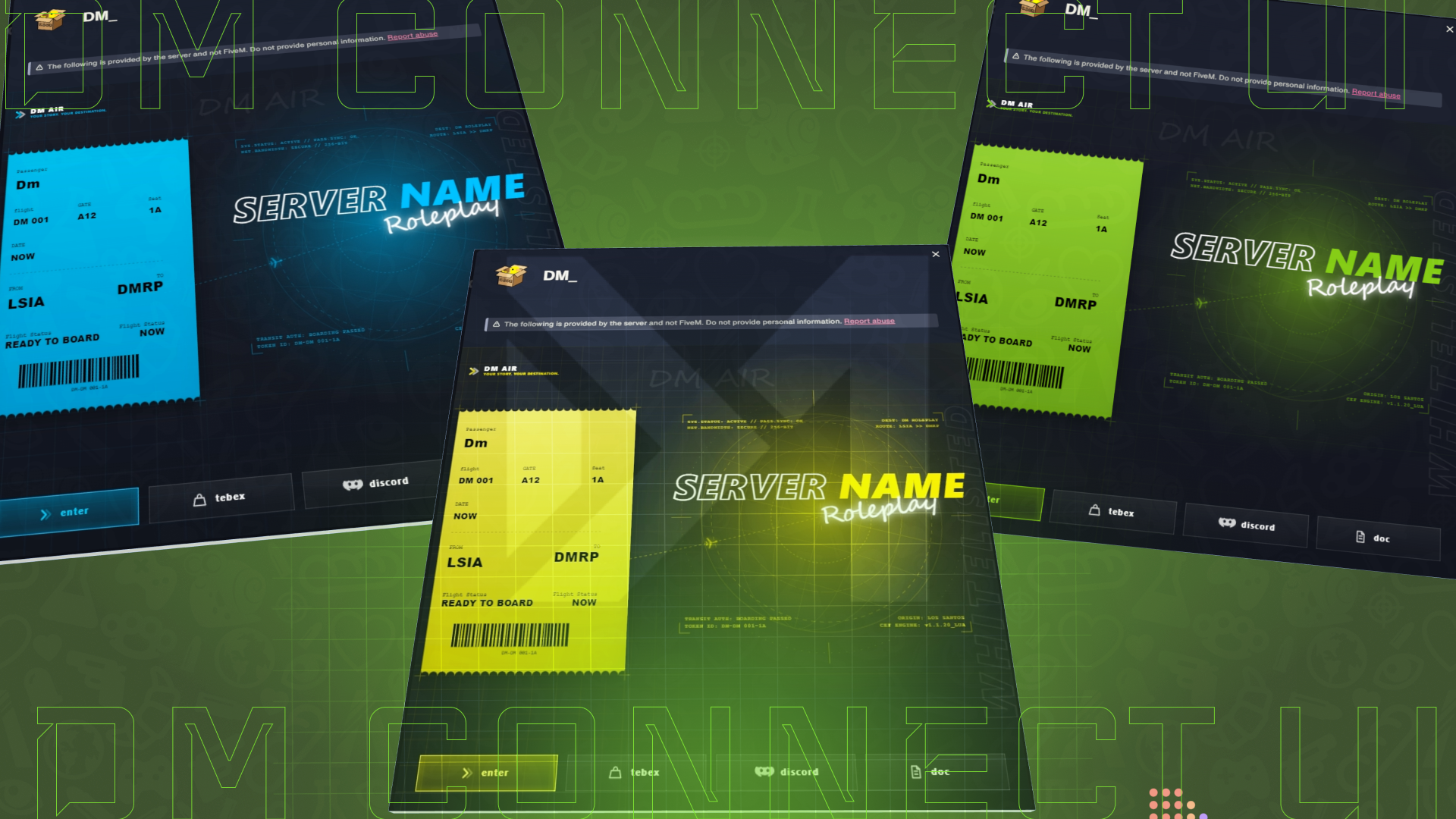
The interface combines a modern digital boarding pass with server branding, player details, destination information, radar-inspired visuals, and configurable action buttons. Its lightweight SVG-based design keeps every visual element clean and sharp without requiring heavy background images.
DM Connect UI is standalone and works with Qbox, QBCore, ESX, and custom FiveM frameworks.
## Features
### Premium Connection Interface
- Modern digital boarding-pass design
- Displays player, flight, gate, seat, route, and boarding information
- Radar-inspired server presentation
- Glass-style panels and accent effects
- Lightweight vector-based SVG graphics
### Complete Configuration Control
- Change the server name and branding
- Edit every displayed text label
- Configure the slogan, document title, and boarding status
- Change origin and destination details
- Configure flight, gate, seat, terminal, class, and boarding time
- Adjust card dimensions and minimum display time
- Enable or disable player confirmation before joining
### 100 Included Themes
- Choose from 100 ready-made color themes
- Select themes by name or index
- Quickly change the complete accent style
- Disable presets and use custom colors
- Configure primary, background, text, border, and surface colors
### Fully Configurable Buttons
- Add new action buttons
- Remove existing buttons
- Change button text
- Select different vector icons
- Configure external links
- Create buttons for Tebex, Discord, rules, documentation, or other pages
- Configure the primary Enter button
### 50 Vector Icons
- Includes 50 roleplay-ready vector icons
- Icons for Enter, Tebex, Discord, documents, rules, vehicles, jobs, security, and more
- Clean and consistent appearance across every action button
### Framework Compatibility
- Qbox
- QBCore
- ESX
- Custom frameworks
- No framework dependency required
## Configuration
Everything is managed from the included `config.lua` file:
- Card settings
- Server branding and text
- Boarding-pass information
- Theme selection
- Custom colors
- Action buttons
- Button labels
- Button icons
- External URLs
- Player entry confirmation
## Installation
1. Place `Dm-connectui` in your server resources folder.
2. Configure the resource through `config.lua`.
3. Add the following line to `server.cfg`:
```cfg
ensure Dm-connectui
```
4. Restart the server.
## Requirements
- FiveM server
- Server artifacts version 5848 or newer recommended
- No external dependencies
## Support
The package includes installation guidance, configuration documentation, theme documentation, and icon documentation.
Reselling, redistributing, leaking, or sharing this resource is not permitted.
This resource is created for FiveM and is not affiliated with Rockstar Games or Take-Two Interactive.
We've proudly served over 100 satisfied customers with our quality products.
Our scripts are optimized for maximum performance so your server runs smooth.
Fast updates, bug fixes, and ongoing support for all purchased scripts.
$34.97
$29.72
$35.00
$29.75
$34.99
$29.74