
100 + Customers
We've proudly served over 100 satisfied customers with our quality products.
Store / Package
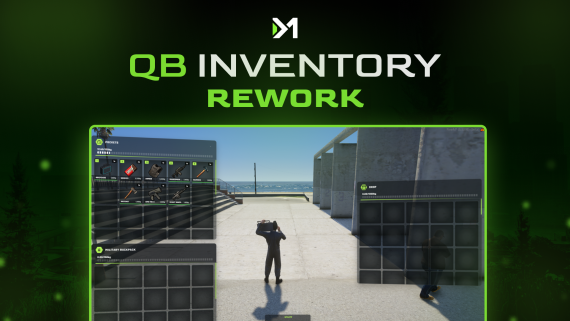
A complete rework of the original qb-inventory — rebuilt for performance, realism, and full modular compatibility.
Just drag, drop, and replace your old inventory system. Everything is pre-configured and optimized for modern gameplay.
🧳 Utility Slots System (New!)
Attach armor and backpack directly from the inventory interface:
Custom UI icons (vest & backpack)
Adjustable slot sizes and labels
Automatic slot management with safe offset handling
🦾 Advanced Armor Integration
Lightweight and heavy armor supported
Job-restricted heavy armor (Police, Sheriff, FIB, etc.)
Repair armor using armor plates or repair kits
Real-time armor value tracking
Dynamic Backpack System
Small, Medium, and Large backpacks
Each has unique slot count and weight capacity
Items stored safely even after reconnect
Container Items
Turn any item into a mini inventory (e.g. briefcase, toolbox, stash bag)
Define allowed items, capacity, and weight per container
Item Drop System Overhaul
Realistic world props when dropping items
Automatic prop model detection from items.lua (modelp field)
Example:
armor = { name = 'armor', label = 'Armor', modelp = 'prop_bodyarmour_03', ... } Each dropped weapon uses its in-game model automatically
Inside config.lua, you’ll find a brand-new UtilitySlots section:
```lua
UtilitySlots = {
enabled = true,
slots = 2,
items = {
[1] = {"armor", "heavyarmor"},
[2] = {"backpack_small", "backpack_medium", "backpack_large"}
},
labels = { [1] = "Vest", [2] = "Backpack" },
icons = { [1] = "vest.svg", [2] = "backpack.svg" },
armorItems = {
["armor"] = { value = 50 },
["heavyarmor"] = { value = 100, jobs = {"police", "sheriff", "fib"} }
},
armorRepairItems = {
["armor_repair_kit"] = 20,
["armor_plates"] = 20
},
backpackItems = {
["backpack_small"] = { slots = 50, weight = 50000 },
["backpack_medium"] = { slots = 20, weight = 100000 },
["backpack_large"] = { slots = 30, weight = 150000 }
}
}
ItemContainers = {
["weapon_briefcase"] = {
label = "Briefcase",
slots = 20,
maxweight = 50000,
allowedItems = { "weapon_flashlight", "weapon_knife" }
},
}
qb-inventory folder.dm-throwitems-qb is started before it.UtilitySlots, containers, and armor options inside config.lua.type column to the inventories table (used for backpacks/containers). Existing data won’t be affected.- Frameworks: QBCore
- Item Drop System: dm-throwitems-qb
- Inventories: All qb-inventory-based forks
- Containers: Fully modular
Full support available through Discord after purchase.
This is not just an update — it’s a next-generation inventory system built for immersive servers.
We've proudly served over 100 satisfied customers with our quality products.
Our scripts are optimized for maximum performance so your server runs smooth.
Fast updates, bug fixes, and ongoing support for all purchased scripts.
Payments, licensing and delivery all run through Tebex, so your purchase is protected end to end.
Just purchased
 Jarod_Sky
Today 09:04
Jarod_Sky
Today 09:04
 gdayrp
Today 02:22
gdayrp
Today 02:22
 stooby14
Today 01:10
stooby14
Today 01:10
 Taiwan_DK
Sat 15:38
Taiwan_DK
Sat 15:38
 lukey2023
Sat 15:26
lukey2023
Sat 15:26
 SaintRPFiveM
Sat 01:01
SaintRPFiveM
Sat 01:01
 Alpharod_75
Fri 21:11
Alpharod_75
Fri 21:11
 BL4K93
Fri 17:31
BL4K93
Fri 12:13
BL4K93
Fri 17:31
BL4K93
Fri 12:13
 MELGAcfg
Fri 06:30
MELGAcfg
Fri 06:30


